 Reset Observatory
Quota Reset Guides / 02
Where Does Unused Quota Go After an AI Reset?
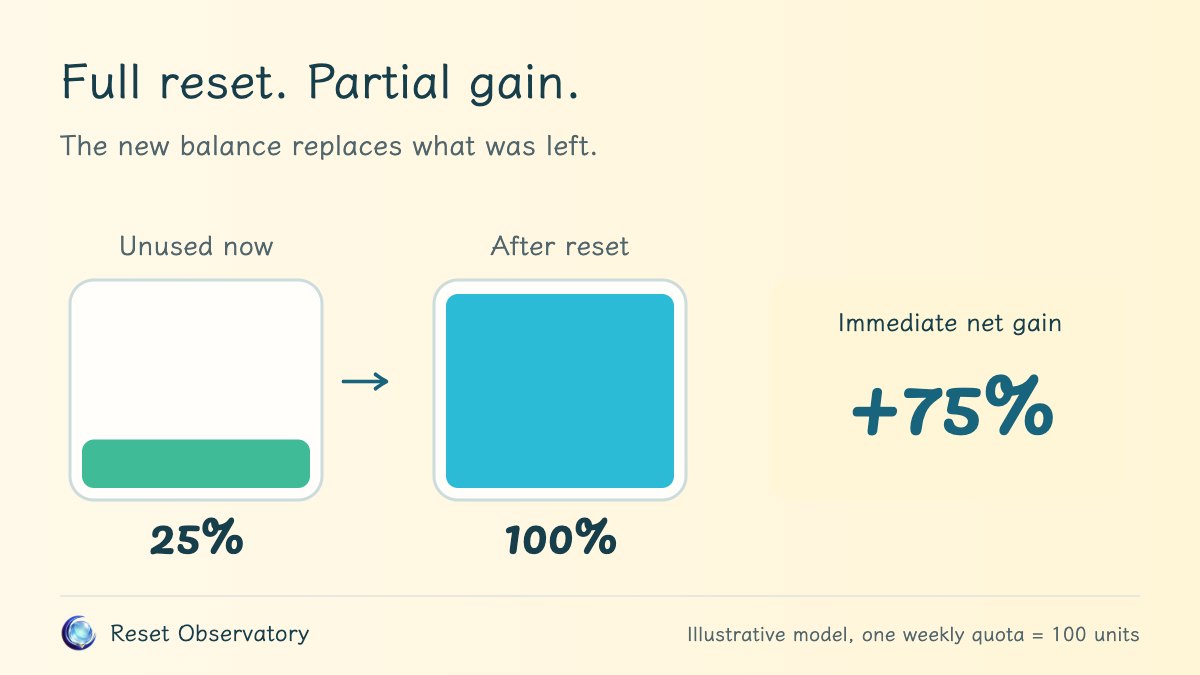
In our replacement model, unused quota is replaced directly by your new allowance: if you had 25 units remaining and a reset brings your balance back to 100, your immediate net gain is 75 units, not 100, and your available balance does not become 125. This logic applies to any system where a reset tops up your balance to full rather than granting a separate rollover credit. Before evaluating your numbers, verify whether your provider uses this replacement rule or issues an independent, stackable allowance.
Contents
- Refilling to 100 is completely different from adding 100
- What the drained green water represents in our visual model
- The more quota you have left, the smaller your immediate gain
- Why you must never subtract unused quota a second time
- What happens if a scheduled refill is due at the exact same moment?
- Why an immediate gain of 75 does not equal 75 more units over your subscription
Refilling to 100 is completely different from adding 100
Assume one standard weekly allowance equals 100 normalized units.
- Adding 100 units: The system preserves your remaining 25 units and adds 100 on top, leaving you with 125 usable units.
- Refilling to 100 units: The system resets your current allowance to full, leaving you with exactly 100 units regardless of what remained beforehand.
Both descriptions mention the number 100, but their underlying mechanisms are entirely different.
Seeing a 100% full indicator on your dashboard tells you nothing about how much new quota you actually received. You need to know your balance at the exact moment of the reset to separate your existing allowance from the newly added portion.
What the drained green water represents in our visual model
To make this concrete, imagine your weekly quota as a water pool with a capacity of 100 units. Before the reset, the pool contains 25 units of green water representing your unused old quota.
In our visual simulation, the system drains these 25 units of green water into an adjacent glass collection tank, then fills the main pool with 100 units of blue water representing your new allowance. The main pool is now full, but the main pool holds 75 more units of water than it did before.
The glass collection tank is not a second usable account. The green water in the tank simply visualizes the volume of pre-existing quota that was replaced. It cannot be spent later, nor can it be combined with the main pool to form a balance of 125. All tanks share the exact same scale and capacity. The color distinction clarifies where the quota came from, not a different billing tier.
This animation illustrates how quota replacement works in concept. It does not claim that the provider backend literally runs a two-step drain-and-refill procedure. From a decision perspective, what matters is the net change in available quota between your pre-reset and post-reset balances.
The more quota you have left, the smaller your immediate gain
The following values assume a standard weekly allowance of 100%, with no scheduled refill taking place at that exact moment:
| Remaining quota before reset | Balance after reset | Immediate net gain |
|---|---|---|
| 0% | 100% | +100% |
| 25% | 100% | +75% |
| 80% | 100% | +20% |
| 100% | 100% | 0% |
Scroll horizontally on narrow screens to view the full table.
The +75% figure represents an effective increase equal to 75% of one weekly allowance. It is not a 75% relative expansion of your starting balance. Similarly, a net gain of 0% in the final row simply means your available balance received no immediate boost at that moment; it does not mean your upcoming refill schedule or your broader subscription remains unaffected.
Why you must never subtract unused quota a second time
The standard formula for immediate net gain is: 100 − 25 = 75.
The 25 units subtracted represent the pre-existing allowance you were already entitled to use without resetting. If you take that 75-unit net gain and subtract 25 again because your old quota was replaced, arriving at 50, you are subtracting the same 25 units twice in the same calculation.
The glass collection tank illustrates the replacement volume, not an additional balance deduction. The same principle applies when comparing cumulative scheduled quota across your billing cycle: as long as the path without a reset already includes the starting balance, you must not deduct that balance a second time from the final difference.
What happens if a scheduled refill is due at the exact same moment?
In our model, a scheduled refill takes priority, and the extra reset applies immediately afterward.
If you enter a remaining balance of 25 units at a moment when a scheduled refill is due, the system processes the scheduled refill first, bringing your balance to 100 units. The subsequent extra reset acts on an already full balance of 100 units, leaving it at 100, so your immediate net gain is 0. You cannot calculate +75% from the outdated 25-unit input, nor can you combine two refills into a balance of 200%.
This is an explicit ordering rule for handling simultaneous events in our simulation, not a guarantee that a specific commercial platform allows redemption when full or consumes your reset opportunity.
Why an immediate gain of 75 does not equal 75 more units over your subscription
Your immediate balance reflects only a single moment in time, whereas your total quota over a subscription depends on your upcoming refill calendar. If triggering this reset postpones the start of your next weekly cycle, the total number of full refills captured before your billing cutoff may change.
Immediate net gain and the change in total scheduled quota before subscription expiry measure two different things, and should never be conflated. For the formulas and worked examples, see how to calculate quota changes before your subscription ends. Keep in mind that scheduled quota totals do not guarantee that you will consume every available unit, nor do they represent financial returns or guaranteed productivity.
You can enter your current remaining quota into the calculator right now to see how much pre-existing allowance is replaced and what your immediate net gain looks like. A full reset. Not a full gain.