 Reset Observatory
Quota Reset Guides / 03
Does a Reset Increase or Decrease Your Total Quota Before Your Subscription Ends?
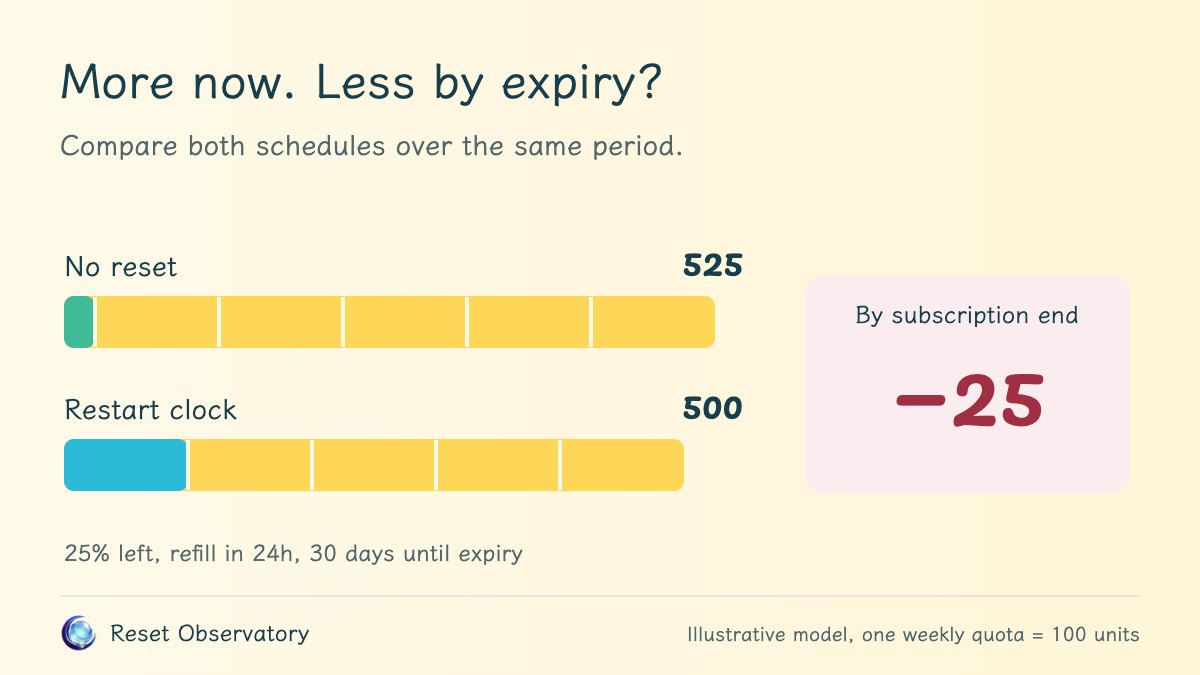
Starting with 25 units and resetting to 100 gives you 75 units immediately. Yet in the standard 30-day scenario analyzed below, your total scheduled quota before your subscription expires drops from 525 units without a reset to 500 units with a reset, resulting in a net decrease of 25 units. Whether resetting leaves you with more or less total quota depends on your starting balance, the relative timing of both refill schedules, and your exact subscription cutoff date. You cannot judge the full outcome from a full balance bar alone.
Contents
- Clarify your metric: immediate balance or total scheduled quota across a window?
- Establishing a rigorous baseline: synchronized start and cutoff dates
- Breaking down Case A: Why 525 units becomes 500 units
- Four formulas to calculate the outcome yourself
- A reset does not always reduce total quota: three reference counterexamples
- How the model handles cutoffs that land on a refill timestamp
- More scheduled quota does not equal higher productivity or money saved
- Run the numbers with your personal billing calendar
Clarify your metric: immediate balance or total scheduled quota across a window?
- Immediate net gain: Measures only the net increase in your available balance at the exact moment the reset occurs.
- Total scheduled quota before expiry: Calculates your starting balance plus all full scheduled refills occurring strictly before your subscription cutoff. Future refills replace whatever balance remains at that time; these units do not accumulate into an ever-expanding reserve. This metric reflects scheduled supply across your calendar, not a permanent static stockpile.
A third dimension is actual usage: how much quota will you genuinely consume? That depends on your daily task rhythm and delivery deadlines. This article focuses on rigorously quantifying the first two structural metrics, without assuming that theoretical quota equals completed work.
Establishing a rigorous baseline: synchronized start and cutoff dates
To ensure a fair comparison, this analysis uses a fixed starting point of 18 September 2026, 21:00:00 and an expiration cutoff of 18 October 2026, 21:00:00, set to the Asia/Tokyo time zone. The span between them is exactly 30 days (720 hours), rather than an ambiguous month-end approximation.
We evaluate only the remaining window from this starting point until the current subscription ends. Usage consumed earlier in the billing period is excluded. Both paths stop counting at the exact same cutoff timestamp. Subscription renewal is not assumed, and any refills scheduled at or after the cutoff are strictly excluded.
All other baseline conditions remain constant: one standard weekly allowance is defined as 100 units, and the scheduled refill cycle is 168 hours. In the reset path, a single extra reset occurs at the starting moment and is followed immediately by a request, restarting the weekly cycle from that point. In the no-reset path, the original refill schedule continues uninterrupted. This represents a standard analytical model rather than a universal implementation of all commercial reset mechanisms.
Breaking down Case A: Why 525 units becomes 500 units
Assume you have 25 units remaining, with a scheduled refill due in 24 hours. In the table below, hour counts are measured from the starting point as hour zero.
Measurement baseline: one standard weekly allowance equals 100 normalized units.
| Strategy | Starting balance | Scheduled refills before cutoff | Refills in window | Total scheduled quota |
|---|---|---|---|---|
| No reset (maintain status quo) | 25 | Hours 24, 192, 360, 528, 696 | 5 refills | 525 |
| Reset now (restart weekly clock) | 100 | Hours 168, 336, 504, 672 | 4 refills | 500 |
Scroll horizontally on narrow screens to view the full table.
The mathematical comparison is straightforward:
- Without a reset: 25 + 5 × 100 = 525 units.
- With a restarted clock: 100 + 4 × 100 = 500 units.
- Net change over the period: 500 − 525 = −25 units.
This result of −25 units means that, compared with maintaining the status quo, you receive 25 fewer quota units across this 30-day period, equivalent to 25% of one weekly allowance. It is not a 25% relative decline from 525, and it does not represent a 25% financial loss of your subscription fee.
The reason is simple: while resetting gives you 75 units immediately, it postpones your next refill to hour 168, causing this fixed 30-day window to capture one fewer 100-unit refill. The net outcome is 75 − 100 = −25 units. This conclusion applies specifically to this 30-day window; it does not mean your account permanently loses a refill cycle in perpetuity.
Four formulas to calculate the outcome yourself
Let U be your remaining quota before resetting, N_orig be the number of scheduled refills captured before cutoff under the original schedule, and N_new be the number of scheduled refills captured under the restarted schedule. Assuming no regular refill occurs at that exact instant:
Immediate net gain
100 − U
Total scheduled quota without reset
U + 100 × N_orig
Total scheduled quota with reset
100 + 100 × N_new
Net change over the period
Total scheduled quota with reset − Total scheduled quota without reset
= (100 − U) + 100 × (N_new − N_orig)
The final net change always combines two components: the difference in your starting balances, and the difference in full refills captured within the window. After calculating this difference, never subtract U a second time: the no-reset total already accounts for that starting balance.
The old balance in the no-reset path serves as a baseline for what you would have held if you had not reset; it does not mean that balance can be recovered after resetting.
If a scheduled refill coincides with the starting moment, our model processes that scheduled refill first, establishing an effective starting baseline of 100 units. For a detailed breakdown of simultaneous events and why you should avoid double-counting, see what happens to unused quota after a reset.
A reset does not always reduce total quota: three reference counterexamples
Using the exact same replacement rules and clock-restart logic, observe what happens when we adjust the input parameters. All quota values are normalized to 100 units per weekly allowance:
| Case scenario | Remaining quota | Refill countdown | Observation window | No-reset total | Reset total | Net change |
|---|---|---|---|---|---|---|
| B: Short sprint | 25 | 24 hours | 12 hours | 25 | 100 | +75 |
| C: Short sprint at full balance | 100 | 24 hours | 12 hours | 100 | 100 | 0 |
| F: 30-day synchronized cycle | 25 | 168 hours | 30 days | 425 | 500 | +75 |
Scroll horizontally on narrow screens to view the full table.
- Cases B and C: In a short 12-hour window, neither path captures any refills before the cutoff. The comparison comes down entirely to the starting balance. The difference depends solely on how much quota remained before triggering the reset.
- Case F: Because the original refill was already 168 hours away, restarting the clock keeps both refill schedules in sync. Over 30 days, both paths capture exactly 4 refills (4 × 100 = 400). With refill counts tied, the immediate gain of 75 units carries through completely to the final total: 500 − 425 = +75 units. This proves that a 30-day window does not automatically result in a quota reduction. Note that Case F explores model boundaries, and does not imply that a commercial provider necessarily allows redeeming a reset under these conditions.
These examples demonstrate an essential principle: changing either your expiration cutoff or your refill countdown can completely invert the result. You cannot extrapolate findings from a 12-hour sprint to a 30-day subscription window.
How the model handles cutoffs that land on a refill timestamp
Under our rules, refills scheduled at or after the cutoff are strictly excluded. The model counts only events that occur strictly before the expiration timestamp.
Suppose you have 25 units remaining, with a scheduled refill due in 24 hours. If your subscription expires in exactly 24 hours to the second, the scheduled refill occurs at the cutoff timestamp and is excluded. The comparison is 25 versus 100, giving the reset path a gain of +75 units. However, if your subscription extends by just 1 second, to 24 hours and 1 second, the original refill falls inside the window. The no-reset total jumps to 125, turning the comparison into 125 versus 100, and swinging the result to a loss of 25 units.
This is an inherent boundary effect in discrete-time counting models. It does not suggest that a user could consume 100 units in a single second, nor is it advice for manipulating subscription timers. Because scheduled quota increases in discrete steps at refill points, you must never treat theoretical quota supply as identical to real consumption.
More scheduled quota does not equal higher productivity or money saved
Even if your calculations show an additional 75 units before expiration, those units may offer little practical benefit if you have no work that needs them during that window, or if other limits prevent you from using them. Conversely, even if your 30-day total drops slightly, using a reset to clear a hard limit and hit a critical deadline can provide immense business value.
To estimate your actual usable consumption, you must evaluate when you send requests, your daily throughput, and how much unused quota will be overwritten at each scheduled refill. Five-hour limits, dedicated model pools, task queue latency, and provider capacity fluctuations are not modeled in this weekly ledger.
The 100-unit figure represents a normalized analytical scale, not a fixed number of tokens, chat prompts, or dollars. None of our scenarios assume that an account will consume 100% of its available allowance.
Run the numbers with your personal billing calendar
Open the Reset Observatory calculator, enter your current remaining quota and your refill countdown, and check your actual subscription cutoff date in the subscription analysis section. The default local month-end timestamp of 23:59:59 is only a quick placeholder; be sure to adjust it to match your personal billing date.
We recommend reviewing your results in two steps: check your immediate net gain first, then examine the change in total scheduled quota before expiry. If you save a share link, it captures your specific inputs and results at that moment; it does not continue reading live data from your account.
If you are holding a banked reset, check its specific expiration window and eligibility terms, as explained in our guide on when to use a Codex banked reset. Only by comparing both paths across the exact same time window can you clearly see whether resetting gives you more quota or less.