 Reset Observatory
Quota Reset Guides / 01
Codex Banked Reset, Should You Use It Now or Wait?
Use a saved Codex banked reset when it clears a limit blocking urgent work. If your remaining quota covers the work until your next refill, waiting may make more sense, provided the reset will not expire first. A full meter is not a full gain: unused quota is replaced, and moving the weekly refill can change the total available before your subscription ends.
Contents
- First, distinguish resets from usage credits
- Clarify three separate timestamps before you decide
- Why a full 100% balance does not guarantee a full gain
- Tomorrow's scheduled refill might not arrive as originally planned
- When to reset right away, and when to wait
- How to use the calculator to evaluate your options
- Where can I check my Codex reset time?
- Does Codex reset at midnight or seven days after I click?
First, distinguish resets from usage credits
Resets and credits work differently. Before making a decision, check which option is available in your account:
- A banked reset: This functions as a one-time reset opportunity that you can hold and redeem when needed, rather than an automatic balance added on top of your existing quota. It typically carries its own expiration date, which you should verify in your account settings or promotion terms. According to official OpenAI documentation, redeeming a full banked reset refreshes both eligible five-hour and weekly windows and changes your future weekly reset date, which you can confirm on your Usage page. Read the official documentation on banked resets.
- A paid instant reset: This applies immediately upon purchase and cannot be banked for later use. Under this documented scenario, the new weekly cycle begins with your first Work or Codex request following the reset, and the next scheduled refill occurs seven days (168 hours) after that request, which may not match the exact moment of payment. Read the official rules for paid weekly resets. This anchor rule applies specifically to the paid instant reset described in that document, and cannot be assumed for every banked reset.
- An automatic or global reset: This is triggered directly by the provider to eligible usage limits. It takes effect immediately and does not leave a saved reset opportunity in your account. It is fundamentally different from a banked reset that requires manual user action. Review the official definitions for both types.
- Usage credits: A separate pay-as-you-go balance, used for eligible usage after included limits are reached. Buying credits is not the same as redeeming a banked reset or buying an instant reset. Compare credits and resets in OpenAI’s documentation.
Clarify three separate timestamps before you decide
| Timestamp | What you need to confirm |
|---|---|
| Reset opportunity expiration | What is the latest date and time you can hold this reset before it lapses? Does it allow you to wait? |
| Original weekly refill time | If you do not trigger a reset now, when will your existing allowance naturally refill? |
| Subscription end time | What is the cutoff date for your comparison window? Which upcoming scheduled refills fall inside this period? |
Scroll horizontally on narrow screens to view the full table.
These three time dimensions operate independently. A reset opportunity expiring tomorrow does not mean your subscription expires tomorrow. Likewise, having ten days left on your subscription does not mean your banked reset can sit unused for ten days.
When recording these dates, always normalize them to a consistent time zone. Note your current remaining quota and the countdown to your next refill at the exact same moment, rather than pairing a morning balance with an evening clock. Once you trigger a reset and change your refill date, you cannot use that new date as the baseline for what would have happened if you had maintained the status quo.
Why a full 100% balance does not guarantee a full gain
In the standard replacement model used here, one full weekly allowance is defined as 100 normalized units.
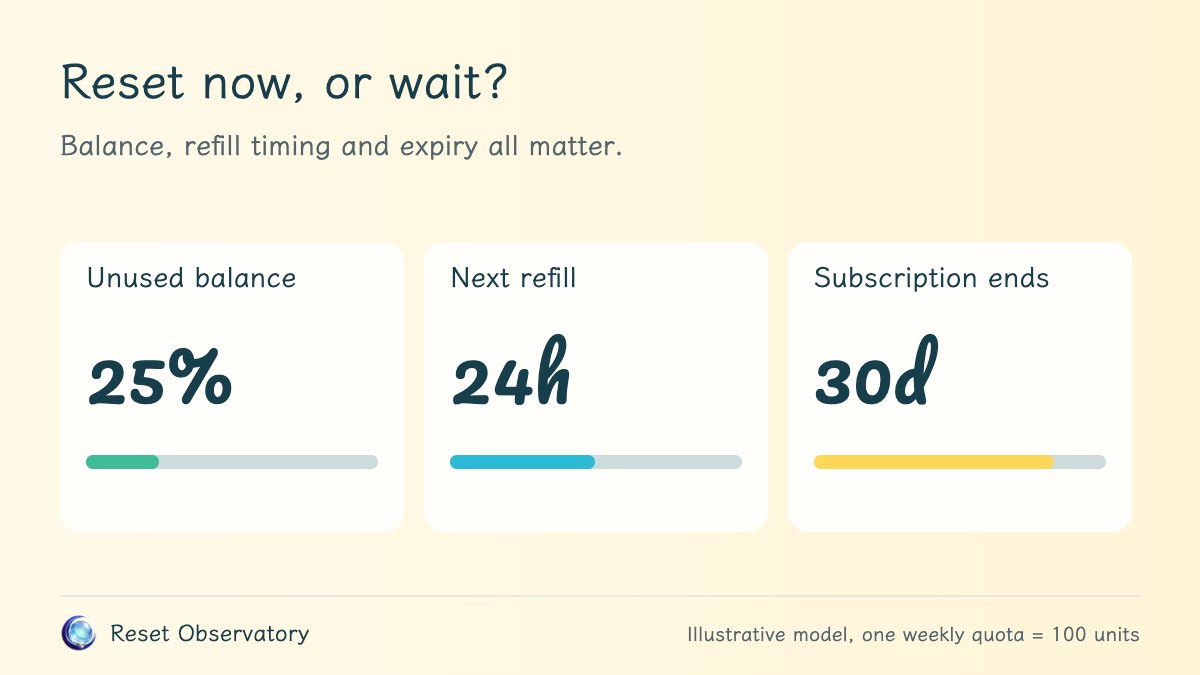
If you currently have 25 units remaining and trigger a reset to bring your balance to 100, your immediate net gain is 100 − 25 = 75 units, rather than adding 100 on top of your existing 25 to reach 125.
This is not a penalty imposed by the system, but the mathematical difference between your pre-reset balance and your new full allowance. The more unused quota you hold when resetting, the smaller your immediate net gain. To see how unused quota and new quota interact in our visual model, see what happens to unused quota after a reset.
Tomorrow's scheduled refill might not arrive as originally planned
To understand the deeper effect on your schedule, consider a standard analytical scenario: suppose you have 25 units remaining, with a scheduled refill due in 24 hours. If you use an extra reset now and send a request immediately, your weekly schedule restarts from this moment on a 168-hour cycle. Please note: this is a theoretical demonstration model used to show calendar effects, not a confirmed universal rule for every banked reset.
Comparing both paths over an identical 30-day observation window:
- No reset (maintain status quo): Starting from 25 units, you receive 5 scheduled refills within the window, yielding a total scheduled quota of 525 units.
- Reset now (restart weekly clock): Your starting balance jumps immediately to 100 units. However, because your refill schedule is pushed back, the remaining 30-day window captures only 4 subsequent refills, yielding a total scheduled quota of 500 units.
Comparing the two totals, you gain 75 units immediately, but your total scheduled quota before subscription expiry is 25 units lower. These 25 fewer units represent 25% of one standard weekly allowance, not a 25% relative drop from 525, and certainly not a 25% loss of your subscription fee. The difference arises entirely because pushing back the refill date causes this specific 30-day window to contain one fewer full refill cycle.
Here, total scheduled quota represents the nominal supply calculated by adding your starting balance and future scheduled refills. It does not mean those units accumulate simultaneously into a single stockpile. For a full breakdown of the timeline and arithmetic, see how to calculate quota changes before your subscription ends.
Conversely, if all other parameters remain the same but your subscription ends in just 12 hours, neither path will receive any future refills before the cutoff. The comparison becomes 25 units versus 100 units, giving the reset path a clear net gain of +75 units. This demonstrates that your outcome depends heavily on your subscription cutoff date, but does not guarantee that you can actually consume those 75 units within 12 hours.
When to reset right away, and when to wait
| Scenario | Recommendation and key considerations |
|---|---|
| You are completely blocked by limits with an urgent deadline | Resetting is generally the sensible choice. First verify that this reset clears the specific limit blocking your work. For high-priority tasks, unblocking immediate productivity is usually worth far more than a minor difference in theoretical calendar totals. |
| Your scheduled refill is arriving soon and remaining quota covers current tasks | Waiting for your natural refill is usually better, provided your reset opportunity will not expire in the meantime. There is little reason to overwrite an imminent scheduled refill just to see a full bar. |
| Your reset opportunity is close to its expiration date | Focus on whether you have genuine workload demand before the expiration cutoff. You do not need to wait until your balance drops all the way to zero, but you should avoid triggering it prematurely if you have no real work to run. |
| Your subscription is ending soon and you do not plan to renew | Run the comparison against your exact expiration timestamp. Refills that fall at or after expiration are excluded. Whether the extra quota translates into real value depends on your remaining hours and task volume. |
Scroll horizontally on narrow screens to view the full table.
There is no universal best move for every developer. Two accounts facing the exact same nominal difference of 25 units can arrive at opposite conclusions depending on whether they are racing against a hard deadline or working at a relaxed pace.
How to use the calculator to evaluate your options
In the Reset Observatory calculator, enter your current remaining quota and the countdown to your next scheduled refill to see your immediate net gain. Then enter your actual subscription expiration timestamp to compare total scheduled quota across both paths over that identical window. Note that the calculator's default month-end timestamp is only an initial convenience; you should always adjust it to match your personal billing date.
The calculator quantifies what changes under these specific inputs and rules, rather than predicting an automated optimal moment to click. If you decide to wait, remember to recheck your balance, your refill countdown, and your reset expiration terms before triggering it later, because those conditions will not remain static.
Finally, if you have hit a five-hour short-term limit, the weekly quota model will not tell the whole story: clearing a short-term block may be critical even when a weekly-total comparison does not capture that benefit. The model does not simulate dynamic short-term rate limits, nor does it guarantee server capacity or concurrent request throughput.
The first step in making a sensible decision: determine whether resetting solves an urgent bottleneck, then check how it alters your scheduled refills across the rest of your billing cycle.
Where can I check my Codex reset time?
Open Settings → Usage in the account or workspace you use for Codex. Check the five-hour and weekly windows separately, and record the weekly refill time before using a reset. Afterward, check the updated time. A full banked reset changes the weekly schedule, so the old refill date is no longer your next refill. OpenAI’s banked-reset instructions.
For the calculator, record quota remaining, not quota used. If a meter says “75% used,” enter 25% as unused. Also check the reset opportunity’s expiry, which is separate from your subscription end date.
Does Codex reset at midnight or seven days after I click?
Do not assume a shared midnight or UTC reset time. Use the timestamp shown in your account. For the documented paid instant reset, the next weekly refill is seven days after your first Work or Codex request following the reset, not necessarily seven days after checkout. Official paid-reset timing.
Our restart-clock calculation assumes you resume using Codex immediately. A delayed first request can move the schedule and change which refills fall before subscription expiry. The calculator does not read your live account or predict future promotional resets.